Sunday, 8 August 2021

Stop Adding Incorrect Details for My Family


This is a woefully common reaction in online genealogy. Whether someone is overwriting your details in a shared tree, or publishing incorrect details about your family in their own tree, it can be frustrating when you see incorrect details published and then blindly copied by others.

But wait a moment, why does your opinion carry more weight than theirs? If you politely tell someone that their details are wrong, and they either ignore you or tell you to go forth and multiply, why would you expect them to change anything? If you provide them with a reference to a census page or parish record (or other) and they say ‘Oh, I already have a John Smith in my tree, so thanks but no thanks’ then you may begin to see the problem.

Yes, there are a few edge-cases, such as someone telling you your own father was Peter rather than Paul, or insisting that you were born in Kathmandu rather than the East End of London, but we are looking at the more general case here.

Far too often, a record by itself does not sufficiently identify a person, or their relationships to other people. Even a group of corroborating records may be insufficient to connect them. But useful evidence is not necessarily the same as a direct answer; to show that John Smith1 cannot be right, yet without confirming that John Smith2 is correct, is still a useful product of your research. In a surprisingly large number of cases, there will be no direct evidence, and the naive expectation fuelled by advertising that you can build your tree from online records, becomes a sad disappointment. To get past such brick-walls, you need to get into inferential genealogy, and this then implies that you need to write up the how and why of your research for it to be accepted. In fact this is a general tenet that applies to all claims, with more details being required where there was more inference. If you need to convince another researcher that their information is incorrect then you need to provide such an explanation.

This is a lesson yet to be learned by the hosts of online records and online trees. Their insistence on the simplistic research model of ‘search here and build it there’, compounded by ‘if you cannot find it, copy it’, has already done untold damage to our collective research.

A few years ago, I drew an analogy between research in academic fields and in online trees at Research in Online Trees, pointing out that in all academic fields (including professional and academic genealogy), it is not a direct A-to-B process. There are intermediate steps where researchers may build upon, or even challenge, past work by other researchers. But for that to happen, dedicated researchers need a way to write up and publish their research for others to find.

Note that attaching  a write up to a particular person or family in your tree is not good enough: even if the text is searchable via search engines such as Google (which it rarely is because it is stuck in a database) then it may not be specific to that person or family. It could involve multiple generations in more than one family. As with those other academic fields, a comprehensive write up will also need basic formatting, and especially a mechanism for footnotes and citations.

Many researchers who fall into this category, and who are not solely interested in academic journals, will resort to blogs. These can be highly effective ways of making such arguments, but they are ignored by the hosts of online trees. Yes, they can be cited (sort of), but you are forced to find them using a search engine. If your surnames also happen to be common terms then this is not going to be very productive. Unsurprisingly, I have explained how these hosts can easily fill that gap, allowing their users to search registered blogs along with their own online records, and without diverting traffic away from those blogs or risking any type of copyright: Blogs As Genealogical Sources. Reactions — few as they were — implied the idea was too complicated, or that it would cost too much money to implement, or that it would involve payments to the blog authors, or simply that no one else does it. All of these notions were ill-founded, but their lack of both vision and responsibility will leave us wanting in terms of a more robust model for sharing and collaboration in general.

Monday, 2 August 2021

Is Pinterest a Valid Source?


At the end of 2019, I made a case for online trees being a valid source, although with some caveats. I recently thought about a similar case for Pinterest, but the situation is not the same there so I wanted to dig over the main issues.


 Like many people, I started a Pinterest account when it first appeared, and then got disinterested when I realised that it was all smoke and mirrors (or images thereof), that my feed could not be tailored to deliver what I really wanted to see, and when I got deluged by unwanted advertising. In fact, I have just closed my account as it had no value for me.

Pinterest has been criticised for many reasons, including some content being pornographic or obscene, being overtly political, hosting commercial scams, spreading misinformation (especially medical), or focusing on people's eating disorders or weight problems. But what was it supposed to be?

According to Wikipedia, Pinterest is an "American image sharing and social media service designed to enable saving and discovery of information ... and ideas", but the reality is much more mundane. It is now basically an image sharing site with no obvious purpose. You see images were supposed to be just a taster that encouraged people to pin them, and click on them to get information; an image on its own — with no caption, link, or accompanying information — is a dead-end.

Let me pick a specific case, one that initially encouraged me to look at Pinterest: images of old places. I love to see historical pictures of my home town, but on Pinterest they invariably contain no details, or any caption. If I wanted to search for an image of a particular place then I cannot — the search bar simply finds boards of that name shared by other users. If I happen upon a rare or interesting image there then I might, if I'm lucky, recognise the place, but what about the date, or the photographer, or the story behind the picture?

If I was doing this as part of a research project then I have a deeper problem: provenance. Where did the image come from? Who took the original, and is it in copyright? Pinterest does have a mechanism for a copyright holder to get material taken down, but this is fighting against the tide because it already makes it so easy for people to share anything and everything that they might find, online or otherwise. At the very least, it should have implemented a mechanism identifying the initial point of entry of an image onto Pinterest, i.e. who first loaded it, and where from.

The situation is more complicated than this, though, and doomed to failure in the hands of people who treat it like stamp collecting. I have several images in my blog posts that I have taken pains to get permission to display from the copyright holders, and I had shared those same posts via Pinterest using those images. And yet I have these images in isolation on other people's Pinterest boards. That is, pinned images, divorced from my blog, without the associated information, and without any provenance or attribution. The images had been appropriated to sit in someone's "gallery" of images that they like, but that serves no purpose beyond the private pleasure of such hoarders.

So, if Google turns up some image during your research that resides on Pinterest, what do you do? Would there be any point in citing it at all, in the way you might for other social media? Google does provide a search-by-image mechanism through which you might be able to identify a non-Pinterest copy — ideally being older and with more details — but then a Google search could equally have found that, so what purpose does Pinterest serve? As a means of sharing, it is naively structured and simply exacerbates sharing issues already present on the Internet. But as a source of information that is worth reading and citing then it is a non-starter.

Saturday, 5 June 2021

When a Place Unlocks a Bit of History

This small post recounts a heart-warming case where knowledge of a place unlocked a bit of family history, and painted events in the lives of my parents and their friends that no document could ever yield.

I have long held that a place is more than just a name, or even just a string of jurisdictional names; it has a history and properties all of its own. I have written many posts that have tried to get this message across — often focusing on the legacy of the GEDCOM model — and have even devised a research data model capable of recording the history, documents, images, name changes, and connections of a place in a fashion analogous to that of persons.

My parents, Stan and Ann, were young when they married: my mother was only 17, and she had me by the age of 18. My father had just completed his two years of National Service when he took a job with Nottingham knitwear manufacturers Harry Prew-Smith Ltd, and it was here that he and my mother first met. They were married towards the end of 1955, but he left that job after less than a year to try and find a better one. He tried working on the railway, first in a shunting yard and followed by a spell in the parcel yards (about seven months in all), after which he tried selling vacuum cleaners and then brushes (about six months in all). He then took a job with Stanton Iron Works but had to give it up after about ten months because of knee problems. He often told me how the heat and heavy manual work there was extremely tough, and how he would come home soaked in sweat, but with not an ounce of fat on him — he weighed less than ten stone when he left. But he then blagged his way into a cooking job, based almost entirely on what he had learned during his National Service. This was certainly not the end of his job-changing but it will suffice to set the scene for this article.

I still remember the St. Ann's district where I lived until the age of five, and where my grandparents continued to live after that. It consisted of Victorian back-to-back terraced houses with little if any amenities: no hot water on tap, no central heating, and no inside toilet. The district had a reputation, but it also had a community — something sadly lost when the slum-clearance programs of the 1970s not simply demolished the houses, and dispersed the residents, but also tore up the streets to lay down different ones. This left people clinging to their memories of that community and any old photographs because there was virtually nothing left that they could point to and identify with.

Facebook groups can be a great comfort to such people, and I was a member of several groups that shared photographs and memories. It was here, in 2018, that I connected with David Marriott, a man who remembered my parents, and my father's family. He even admitted to a romantic "fling" with my father's younger sister, Gill, and that she had a best friend, Christine Broadley, whom she went everywhere with; the pair even dressed the same. He recalled that my father and his younger brother, Ray, were older than him, but my cousin (also a David) was about the same age. There was a youth club — the Sycamore Youth Club, run by an Eric Wheatley — on Lavender Street, and my father and cousin used its basement as a gymnasium since it had the weights and other equipment down there.

He then shared a photograph of himself taken in about 1957; he knew it was in my "mother's living room", but not really where or by whom.


Figure 1, David Marriott, around 1957, displayed with his kind permission.

I took one look at the awful wallpaper behind him and thought 'I know that pattern. I've seen it before somewhere'. So I went through my own photograph collection looking for something similar, and came up with the following:


Figure 2, Ann Proctor, around 1957.

A closer match you could not find: the wallpaper is the same, the seat and cellar door (to the right) are the same, and the lighting is the same. The picture of my mother was taken by my father with a homemade pinhole camera (real ones were very expensive back then), at 9 Manning Grove, Nottingham, and developed by himself. David's picture was not only taken at exactly the same place but probably on the same evening, too.

My grandparents lived at 15 Manning Grove, and 9 Manning Grove was the house of Keith Walker, which my parents rented for about a year. My mother and Keith Walker's wife used to make the tea at the gymnasium.

That was enough to jog David's memory. "Goodness," he said, "I recognised her straight away". He recalled that my father was working night shifts at Stanton Iron Works, and so she was on her own, except for yours truly who was only about one year old. Because she was a bit lonely and scared in someone else's old house, David, Gill, and a few more friends used to go round to keep her company, eat chips (that's "fries" to my American friends) and drink all of her tea. I passed these recollections onto Gill, my cousin David, and my mother (my father having sadly died a few months earlier) and they all wanted to know how the others were doing. My mother said they used to have a great laugh on those late evenings, and it really helped a young mother cope.

That's real history, painted in vivid colours!


Friday, 16 April 2021

What is SVG? Publishing Trees for Free

This question should be of interest to anyone who has considered publishing their family tree on a subscription-free website that requires nothing extra to be installed.

Maybe you haven't thought about this in any great depth, but the website or desktop product that you currently use to maintain your tree is going to be inappropriate for some of your family and friends. Assuming that you do want to share with them, they will simply want to link to some web page, without paying for anything or having to install anything, and see a presentation edition of your tree, your family history, your images, etc. They won't want to see any buttons or options for maintaining that information.

This was the situation with all but two of my extended family wanting to see my own research (those two also happened to be genealogists), and so I decided to develop some software with this goal in mind. I also had a goal of drawing trees that could be included into my blog-posts so I came up with a tool that satisfied both requirements: SVG Family-Tree Generator (SVG-FTG). But what is this SVG?

SVG stands for Scalable Vector Graphics. It is a language for defining graphical shapes in your browser, and handling user interaction with them. It is quite different to normal image formats as it scales indefinitely without going fuzzy when you zoom in. SVG-FTG converts your family tree, including biographical notes and images, into an HTML document that employs SVG to produce the graphical parts of your tree, CSS to style the presentation, and JavaScript to handle user interaction.

Figure 1, a common example of what SVG can create.

I will try not to get too technical, but I do need to make some clear and careful points as SVG often gets "bad press" for inappropriate reasons. SVG is like a sister technology to HTML: HTML is good at presenting text, forms, menus, images, and frames around such content. It's ubiquitous so I don't need to describe its full capabilities; SVG is good at drawing shapes and lines, and including text or images within those shapes.

Superficially, their structure looks the same with their elements defined by opening and closing tags, each in angle brackets. For instance, this small HTML extract presents a level-1 heading with a paragraph of text following it:

<h1>This is a title</h1>

<p>This is a paragraph

of text</p>

The following SVG extract draws a rectangle with a circle inside it:

<rect x="100" y="100" width="200" height="200" fill="yellow" stroke="black" stroke-width="3"></rect>

<circle cx="200" cy="200" r="90" fill="orange" stroke="navy" stroke-width="10"></circle>

SVG is technically a separate XML-based language, which means that its syntax follows slightly different rules to HTML, but that difference is not relevant here. It does mean, though, that it can be placed in specific files of its own — usually named *.svg — and they can be treated like normal image files, but more on this in a moment.

When the SVG is embedded within an HTML document then it is referred to as "inline SVG", and this is what SVG-FTG generates in order to produce a graphical user interface (UI). Together, these two contributions to the UI — HTML elements and SVG elements — can produce a very sophisticated presentation. They also share the event mechanism, which basically means that the way they respond to user clicks and button presses is the same, and that means that they collaborate to implement an application: a tool delivering useful functionality to the end-user.

Figure 2, Example of application generated by SVG-FTG.

So, in this guise, there is nothing sinister or risky with SVG; it is simply another contribution to the UI. It uses JavaScript and CSS in the same way as most HTML pages do.

But the other scenario — that of separate SVG files — is subtly different. They're really document files rather than image files and so can also contain JavaScript and CSS. The problem comes if they are naively treated as image files because they can harbour malicious content. For instance, if they are deployed as a CSS background image, or a logo on some website, or in some image gallery then such content could be activated. At the very least, this could lock-up your browser (the so-called 'Billion Laughs' attack), but could also lead to 'HTML Injection' and 'Cross-Site Scripting' attacks.

This means that many sites capable of loading images are very careful to either disable such SVG image files or sanitise them by removing any script. Unfortunately, this protective action can spill over into a complete rejection of SVG because the two scenarios that we've mentioned have not been sufficiently well defined and distinguished.

One example of this involves Wordpress.com — not Wordpress.org which is the self-hosted and unrestricted variant. It is well known that you have to jump through hoops to get any <script> or <style> elements into your page, as well as certain special ones such as <embed> and <object>; but it also seemed to strip out inline <svg> elements for no apparent reason. Note that the <svg> element is not mentioned at all on their page: https://wordpress.com/support/code/ (at the time of writing), leaving its viability in some doubt.

There are various plug-ins that may be used with Wordpress.com but all of the ones that I am aware of relate to the loading or sanitising of "SVG files", which we explained is not our situation.

When pressed on this point, and given the specific example of the TimelineExample.html mentioned in the SVG-FTG guides, their support provided the following details.

Users would most likely need to upload the above mentioned HTML file through SFTP and not including it between the custom code widget/block. They’d also need to be upgraded to at least the Business plan to be able to do that. [13 Apr 2021]

When specifically asked about support for the <svg> tag, the following response was given:

By default SVGs are something that’s not allowed/supported by WordPress, so I guess they’d need to install a third-party plugin that allows them to be able to work with and include SVGs... [13 Apr 2021]

The term "SVGs", used here, would appear to mean "SVG files", which I went to great pains to eliminate as not relevant to my question. It does seem as though they are fixated on "SVG image files" and have little concept of its usage to provide a graphical UI for an application.

However, after escalating this issue, Wordpress.com demonstrated to me that it is actually possible to host these SVG-FTG applications on their site under the Business Plan, and that the process is not too different from the Wordpress.org one. In their words: “It is also a simple process of copy and pasting. Although, I added all the CSS and JS to the head of the site as on your example URL and only loaded the content in the body via the Custom HTML block”. Hence, although neither of these Wordpress scenarios is actually free, it is possible to host SVG-FTG applications on them both. It’s just a shame that “inline SVG” is so poorly understood and catered for, generally.

For a successful alternative, see this videon Publishing your tree for free with no hassle.

Friday, 26 March 2021

SVG Family-Tree Generator (v6.0)


The word is catching on about this free tool (SVG-FTG, for short), whether for publishing family trees on your website or blog, or simply for providing an interactive visualisation for the benefit of you and your family. As a result of this, some considerable effort has been made to produce a much-enhanced V6.0.


In fact, during its time of steady incremental growth, this is by far the biggest set of changes as they are greater than all the previous changes combined.

So what's new in V6.0? Well, there are three main areas of change:

  • Applications and Services: Packaged interactive applications and services that can be selected from a simple menu. No more coding.
  • Viewpoints: The ability to view and maintain different parts of a large tree separately.
  • GEDCOM Export: SVG-FTG already supported import from GEDCOM files, but it now supports export to GEDCOM files, too.

What is SVG-FTG?

SVG-FTG generates Scalable Vector Graphics (SVG), in combination with HTML, CSS and Javascript, to display interactive family trees in your website or blog. Unlike normal images, SVG is a format that does not go all fuzzy when you zoom in. There are several packaged applications that can be run from your tree, and an open framework to develop your own. It supports complete control over layout, thumbnail images, hover text, HTML biographical or historical notes, scrolling/zooming of individual trees, GEDCOM, timeline reports, and linked trees. The designer is Windows-based but the output is neutral and runs in all modern browsers. Note that the output is non-proprietary, royalty-free and needs nothing to be installed first; it is therefore ideal for sharing with friends and family.

Where is SVG-FTG?

There have been several previous posts about SVG-FTG: Interactive Trees in Blogs Using SVG, More on SVG Family Trees, and SVG Family-Tree Generator (v5.0).

Details of availability can now be found on the summary page: SVG-FTG Summary.

Presentation

The general presentation quality has been improved again, particularly under high magnification (i.e. when zooming in to a high degree). For example, there is now no visible overlap where lines join. The colours have been standardised to remove previous differences between SVG-only and mixed HTML/SVG modes.

A number of presentational enhancements are placed under the control of the end-user:

  • It is possible to nominate a background image upon which your tree will be drawn, including its opacity and whether it is repeated across the available height and width. The image at the head of this article shows an example.
  • Improved choice between scrolling and scaling of large trees. In other words, whether you want to see everything at once and zoom in to see the detail, or to see a part of the tree at normal magnification and pan around to see the rest.
  • Person-boxes can now be opaque or translucent, without changing the visible colour. This will be a consideration if you have a background image, or if you are using "fanned" lines rather than the normal horizontal/vertical ones.
  • You can nominate stock images, according to sex (e.g. head-and-shoulders silhouettes), to display in the absence of thumbnail images for persons.
  • You can add custom CSS class names to person-boxes, family-circles, lines, and notes panels, either for application purposes or to change their presentation.
  • Default size of person-box buttons has been raised from 10x10 to 12x12 pixels, but this may be changed via the settings form.
  • There are now fields in the settings form to change the size of person-boxes and their separation.
  • SVG-FTG never worked properly before with Internet Explorer (IE) 11 because it is such a non-standard browser; but this has now changed.

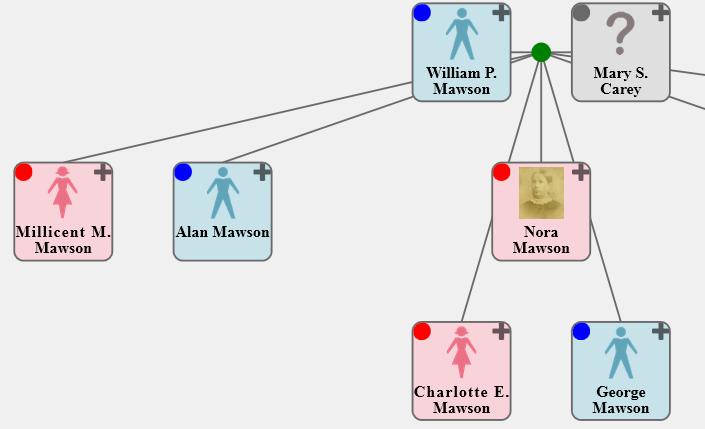
The following image shows a partial tree demonstrating the possibility of bigger buttons (in both default and icon modes) and the use of stock images for person-boxes having no thumbnail image. It also demonstrates the use of opaque person-boxes in conjunction with "fanned" lines.


Applications and Services

One of the main goals of SVG-FTG was to produce interactive trees — not just static images. That means being able to utilise a tree as the user interface (UI) to different applications and services, or in other words to make a tree do things for you. Previous versions already offered some examples in the form of 'Timeline Reports' and pop-up 'Information Panels', but they sometimes required editing of the code.

This is arguably one of the biggest changes to SVG-FTG as those previous applications, and several new ones, have now been packaged up. This means that their definitions and configurations have been placed in a separate registration file, and the end-user just selects the required ones from a simple menu; there is no longer any requirement to see or change code as it's now generated for you, based on your selections.

If you require applications to be configured differently (e.g. change the mouse-click operations, change the button allocations, or even to add new buttons) then it can be done with a small adjunct to the standard registration file; you don't have to edit the distributed standard one.

Additional applications (i.e. in addition to the existing Information Panels and Time Reports) include:

Expand Notes

If you are working in SVG-only mode, or you have lengthy biographical notes, possibly with multiple images, then the existing Information Panels may be insufficient. This application allows them to be displayed in a separate browser tab instead. For instance:

Notes for family of Henry Proctor and Elizabeth Turton


Married 2 Oct 1858 at Nottingham St Nicholas.

Find Persons

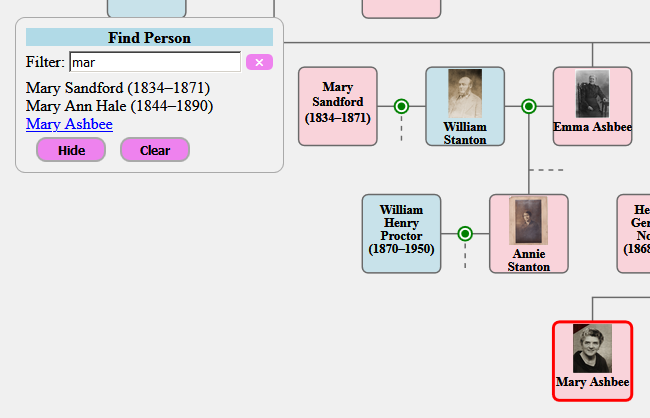
With a large tree, it can be hard to find specific persons. This application provides a floating (i.e. movable) search box that allows you to filter a list of the available person captions until you can see the one(s) that you want. You can then select from the list which will cause them to become highlighted.


As you type a partial caption name into the search box, the list of possibilities is filtered. You can select multiple captions, and the borders of the selected ones are highlighted as shown above. As well as highlighting a relevant person-box, a selection also ensures that it is visible by automatically scrolling the tree as necessary.

The 'Clear' button removes those highlights, and the 'Hide' button collapses the search box until you need it again.

Ancestor Links

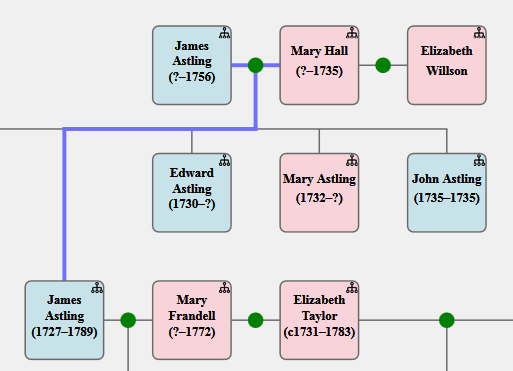
This application is similar to the standard RootKey feature provided by SVG-FTG, except that it is dynamic. Clicking on the button (a tree icon by default) for any person will show their maternal and paternal ancestral paths, all the way to the top of your tree. For instance:


Alternatively, performing a shift+click operation on the button will just highlight the relevant person-boxes of the ancestors, as in the Find Persons application, above. An alt+click operation will show both modes together. A control+click operation on the button clears the current highlighting.

The application collaborates with the older RootKey feature to provide a "start-up person" in your tree. Such a person is highlighted and scrolled into view.

Compendia

This application uses pairs of titles and URL data links held in the "program data" tab of persons (and families). Clicking on the button (a document icon by default) will present a list of any such references in a floating dialog, and clicking on any of the entries will show their contents in a new browser tab.

These references may be to articles, blog-posts, documents (e.g. PDF), images, or anything with the URL link.


A shift+click on that button will highlight all persons or families that have at least one data link in common with the clicked one, implying that they share references in the same article or appear in the same image. An alt+click on the button will highlight all persons (and families) having any such references available. A control+click on the button will clear any current highlights on all elements.

Linked Trees

This application allows you to link together separate trees such that clicking on a person-box button will take you to some associated person in a target tree, or present you with a menu if there are several to choose between. The application is general-purpose, but it is also employed by the Tree Viewpoints, described below.

Application Development

The packaging framework for interactive applications and services is open, meaning that it is documented and it can be added to, allowing custom applications to be shared with other users. If you are a developer, or a "power user", then you can write your own applications and register them for selection by end-users using the same mechanism provided for registering and configuring the predefined ones.

There are many new features for helping such development, including several libraries of code for accessing 'navigation data' (data about persons or families, and their relationships), 'notes data' (i.e. biographical notes, images, links), and 'program data' (application-defined data). Services, as distinct from applications, include reusable UI elements, such as a message-box dialog for reporting errors or asking questions, and a menu dialog for making a choice from several alternatives.

Tree Viewpoints

A disadvantage of presenting all your persons and families at the same time is that (a) it rapidly becomes unreadable, (b) the lines become messy because they usually have to cross over each other, and (c) it consumes more memory. Most products avoid these issues by keeping all the persons and families in a database, and only showing you a selected group at once, which inevitably means that you no longer have any control over their layout.

A viewpoint is a view onto a sub-tree of your loaded persons and families. What this means is that although the full tree will still show every person and family that you have defined, a viewpoint can be used to focus on just a few of them. You can have many viewpoints defined, and persons or families may appear in multiple viewpoints if required.

When a viewpoint is loaded into the Tree Designer, things operate virtually the same as when a full tree is loaded, except that there is less clutter and complexity. A typical usage of viewpoints is to break down a large tree by surname or by family groups.

It is very easy to flip between your viewpoints in the Tree Designer, or to find a person among multiple viewpoints. A Viewpoint Manager is provided to help with creating, deleting, and modifying viewpoints, but also to manage the allocation of persons and family groups to at least one viewpoint. A typical goal is to view your final family tree as a set of sub-trees, each in a separate browser page, and all connected by hyperlinks. In order to achieve this, the Viewpoint Manager helps you manage the dividing-up of the full tree, and ensuring that no person has "fallen through the cracks".

When the HTML (or SVG) code is generated for your browser, by the 'View' button, then it utilises the Linked Trees application. This general-purpose application allows users to link their trees according to different person roles, but the viewpoint feature also uses it to link the viewpoints according to persons in common between them.

The following illustration of clicking on a button in a person-box and selecting an option to go to another viewpoint in a second tab is based on a sample distributed with SVG-FTG.


An important feature of the Linked Trees application is that it names the tabs, which allows it to maintain a finite set of them. If a target tree is already loaded then control is transferred there rather than loading it yet again. Having parallel access to these "tabbed trees" is very powerful given that they can each run their own applications.

GEDCOM

Previous versions already allowed the importing of GEDCOM data, but it is now possible to export your current tree in GEDCOM format. It should be noted that the tree definition format, as used by SVG-FTG, and GEDCOM serve quite distinct purposes, and so totally lossless round-trips (e.g. when importing a GEDCOM file and re-exporting it) is not guaranteed.

As well as exporting all the person and family details (including their notes) that you have loaded in SVG-FTG, this operation also saves your place-key mappings, your tree layout (i.e. person-box coordinates), and any local settings on your persons and families. It saves a copy of the remote (URL) version of any image references that employ place-keys (i.e. the mechanism used to access both local and remote resources in parallel). It does not save any details from the 'Program data' tabs or any of your viewpoint definitions.

The existing GEDCOM import has also been enhanced in the area of personal names, particularly where a person has multiple names, or they have been stored in itemised format rather than as a single string. The import operation also acknowledges any adopted or fostered status of children in a family.

Settings

The standard settings form has been split into one for core settings (as used by everyone) and one for advanced settings (as used more by developers or "power users"). The first of these is very similar to the form used in previous versions, except for a few new options and control over any stock images to be displayed in the absence of thumbnail images. The advanced-settings form contains options relevant to the size and position of person-boxes, button configuration, code generation, and nominating a background image.

Media Enhancements

Users may have experienced problems with record terminators when moving files between Microsoft and Apple systems, or even when loading GEDCOM files exported by certain systems. SVG-FTG now endeavours to identify which terminators are being used, and then honour appropriately. This even includes the non-standard CR-CR-LF that often results when a file generated on one system is processed on a different one.

Through a limitation of a code library being used by SVG-FTG, it was not possible to specify PNG images in the Tree Designer, although all image formats are accepted in the output files by the browser. This has now been fixed by adding custom code to specifically support PNG. The change should be seamless so that you can select either PNG, JPG, or the other formats, in the same way.

Sundry

The edit-person form can now capture multiple personal names, as distinct from the long and short person-box captions. This is particularly important if you intend to interface to other systems, such as through GEDCOM export.

The editing of HTML notes for persons or families has been enhanced so that it automatically finds the corresponding start and end tags, and offers forms for editing selected elements. Those forms will preserve any attributes that it does not yet support.

When creating either a person or a family, a default key name is automatically generated. This can, of course, be modified if you don't like it, but it is designed to help make the process quicker.

Previous versions of SVG-FTG offered three sex options: male, female, and unknown/unspecified. This is now supplemented by a further indeterminate/other option.

The 'Find Person' menu option in Tree Designer now scrolls a selected person-box into view if it is not currently visible. It will also find a person across any viewpoints that you may have defined. The option can now be accessed using a Ctrl+F shortcut in addition to the normal menu option.

SVG-FTG relies on a number of external resources for the output HTML/SVG to work, and this includes JavaScript files, CSS files, and icons. Although these were held in a folder on a neocities.org site, all references now use a custom domain in order to obscure and decouple that connection (i.e. https://parallaxviewpoint.com/SVGcode).