Showing posts with label SVG. Show all posts

Sunday, 27 March 2022

SVG Family-Tree Generator (v6.3)


This post announces the release of SVG-FTG V6.3. Details on availability can be found on the summary page: SVG-FTG Summary.

Whereas the main theme of the preceding SVG-FTG V6.2 was integration with other software, the main theme for this version is special effects. This means that the topics will probably appeal to a wider audience.

In fact, most of the effects described below arise through the introduction of a single enhancement: the generation of a "ghost box" for each person-box. This is just another SVG entity but it can be customised to do these things below or things of your own choosing.

SVG doesn't have the concept of a programmable "z order" like HTML has, and so you cannot explicitly layer entities to control what overlaps what — the last thing drawn will overlap anything else at that position, and this is called the "painters algorithm". SVG-FTG is careful to draw the person-boxes, lines, images, buttons, etc. to ensure that, for example, lines do not overlap person-boxes. However, SVG-FTG V6.3 has implemented its own "z order" such that the new "ghost boxes" can be placed at the right overlap position. Detailed instructions for the effects illustrated here can be found at "Program Notes : Application Development : Header Files : Special Effects".

Three-D Boxes

The appearance of three-dimensional person-boxes can be quite an eye-catching effect. Although it looks like a simple side-plus-top shaded projection, the effect also puts a flare on the family-circles to make them look 3-D, and rounded ends on the lines so that they look more pipe-like when connecting the person-boxes,


The orientation of the projection, the shading, and the angle or length of the projection, can all be configured.

Drop Shadows

Drop shadows give the impression that each person-box is casting a shadow on a canvas, just a short distance behind the tree.


Picture Frames

Placing a picture frame over each person-box may sound a little over the top, but it can produce interesting border effects if you chose something nicer than this particular example.


Round Boxes

I thought about doing this years ago, but decided that it was too complicated. I was very happy when I found that it just fell out of this general-purpose special effect mechanism.


You can control the aspect ratio to change the circles into ovals, and even add the normal buttons onto such person-boxes.


Header Files

Long-time users of SVG-FTG will be aware that the header file templates employ a system of substitution variables in order to configure them according to your selected options. For instance ??title?? would deposit the title that you have assigned to the current tree.

That scheme has now been extended to include conditional compilation, expression support, and temporary variables. This feature was necessary in order to support the special new effects.

See "Program Notes : Application Development : Header Files".

Sundry

The 'Copy Descendants' option was accidentally omitted from V6.2 in the Viewpoint Manager. This very useful option was added to the Tree Designer and the GEDCOM Loader in order to make it easier to copy or transfer multiple families.

This has now been added to the Viewpoint Manager, thus making it easier to split very trees into usable viewpoints.


Friday, 31 December 2021

SVG Family-Tree Generator (v6.2)


Announcing the release of SVG-FTG V6.2, and its main features. It is true that V6.1 was only released a short while ago, but I need to clear my own wish-list and a list of suggestions from users in order to proceed with other work. It is expected that V6.2 will be last feature release for a much longer period. Details on availability can be found on the summary page: SVG-FTG Summary.

An underlying theme in this version is a better ability to integrate with other products, including better support for automation, support for usage within <iframe> elements, local application registration files (for easy customisation), documentation of the private GEDCOM records specific to SVG-FTG, and a new application to get person or family information from an external source. The value of this lies in the fact that SVG-FTG has created a niche for interactive graphical web-based presentation trees that rely on standard technologies and that do not require a database or paid subscription.

The feature highlights below will mention the relevant sections in the updated documentation.

Private and Living Persons

It is now possible to hide the details of living and/or private persons. The latter feature allows specific persons to be flagged as private, irrespective of whether they are living or not. There are independent text and image substitutions for these two scenarios. There are also guidelines for how to maintain pruned editions of your tree where persons and families may be physically removed for selected readership.

An additional menu option has had to be provided to ensure that all person and family keys are obscured, and no longer relate to names or captions.

See "User Guide : Hiding Selected Persons".

Tabbed Content in Notes

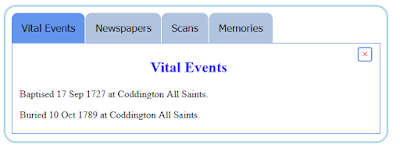
Biographical and historical notes can now utilise tabs to better organise larger amounts of data. For instance, you may want to separate vital events from memories, or from document scans.

The beginning of a new tabbed section can be easily marked (or modified) using a new button on the 'HTML Toolbar' in the Edit-Person or Edit-Family forms. These will be rendered as selectable tabs when viewing the notes in the 'Information Panels' application, e.g.


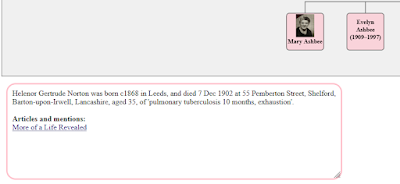
A similar rendering is provided when they are viewed within the 'Expand Notes' application:


See "User Guide : HTML Editing : Tabbed Content", and "Program Notes : Tabbed Content".

Copy and Paste

The copy-and-paste features in the Tree Designer, and when bringing in elements from an imported GEDCOM file, were quite small-scale (i.e. multiple individuals, or a single family and their children). This has been extended with a 'Copy Descendants' option that copies a spouse-pair, their children, spouses of children, spouses of spouses, and so on down the generations.

See "User Guide : Tree Designer", and "User Guide : GEDCOM Browser".

Resizable Information Panels

The pop-up information panels used for displaying notes may now be resized using "grab handles" in the bottom-right corners. If you click on these then you can drag them up/down and left/right to resize a panel.


See "User Guide : Applications and Services : Information Panels'.

Customising Applications

Additional elements have been added to the application registration XML files, and these allow your custom XML files to more easily modify application configuration or CSS styling.

See "Program Notes : Application Development : Header and Trailer Code".

Local tree-specific registrations files are now supported as a supplement to the system ones (which apply to all trees), and may be specified using the new header setting AppSrvFile, or through the Advanced-Settings form.

See "Program Notes : Application Development : Application Registration".

External-Information Application

A new interactive application has been added to link to information in an external source. This 'External Information' application will follow a hyperlink when clicking on a person box or family circle, and better helps integration with data held in other products.

See "User Guide : Applications and Services : External Information".

Automation

There are new command-line options to make automation easier. These include ones for loading and converting GEDCOM files, running minimised, establishing a log file to capture all progress messages, and terminating SVG-FTG when automated tasks are completed.

See "User Guide : Command-line and Shortcuts".

Iframe usage

There are new header settings (Iframe=boolean and ValidOrigins=list, accessible through the Advanced-Settings form) for creating a tree that may be embedded in the <iframe> element of a hosting page. The support includes a simple communication service such that the hosting page can request information from the embedded tree. A common case would be asking for the size of the SVG frame so that the enclosing <iframe> element can be resized appropriately. The ValidOrigins setting a security features that allows the embedded tree to checking that the requests come from an authorised page.

See "Program Notes : Configurations : Iframe Usage".

Image Errors

Image-loading errors are now better handled, and are indicated in both the Tree Designer and the browser by substituting a custom error marker.

See "User Guide : Tree Designer : Person Images".

Alternative Fonts

The standard font used in person-boxes was 13px Times New Roman. The only variation of this occurred when Small=True (which was also implied if Blog=True), in which case the font size was reduced to 10px. There is now explicit control over the choice of font style and size using the new header settings: FontFamily and FontSize. The chosen font can also be styled using new FontBold and FontItalic settings.

See "Program Notes : Configurations : Fonts".

Access to All Settings

A new form provides access to every possible header setting in a tabular form that may be more familiar to developers. This is an additional option and does not displace the original forms that use logical grouping to organise the supported settings.

See "User Guide : Tree Designer : All Settings".

Saturday, 13 November 2021

SVG Family-Tree Generator (v6.1)

The release of SVG-FTG V6.0, back in March, has been very successful. There was an article in the UK Family Tree magazine, and an online interview with me. Details of availability can be found on the summary page: SVG-FTG Summary.

It is now time to release V6.1. The major feature in this version is an "album" of all your images that can be browsed or searched from your web browser. This feature was actually deferred from V6.0 because of the enormous number of other features and improvements already in there.

Although an experienced software developer, I am also a genealogist and a user of this software. Hence, new features are usually added because I have a genuine need for them, and the software is made freely available both because it was never written for commercial gain and because I expect many other genealogists to have similar goals.

One of these goals relates to images. SVG-FTG V6.0 supported thumbnail images in the person-boxes, and arbitrary images in the biographical or historical notes for either persons or places; however, I needed something more than this. Expecting all images to be relevant to a specific person, or even to a family, would put SVG-FTG in my own firing line that criticises other software. I have images that relate to groups (e.g. weddings or parties) and some that relate only to places. I wanted to be able to catalogue them such that I could search for people and/or places, and view associated textual notes, or simply to browse them. I wanted this to be possible on my local computer or on a website. But most importantly, I didn't want my images modified, renamed, copied, or moved in any way from my originals — a requirement that all responsible genealogists will immediately understand.

Image Album

SVG-FTG 6.1 provides a tool to maintain distinct groups of images (termed "galleries") and add meta-data to the individual images. This can include a caption, a place description, associations to persons in the current tree, and general textual notes. The images can be of anything you want, including groups and document scans, and so are not constrained to be of specific persons.

At a point of your choosing, all the images in all your galleries can be indexed for presentation and searching using a Web browser; this indexed set is termed an "album".

NB: None of your images are moved or modified in anyway. Separate storage records all this meta-data, but it is indexed so that your images can be viewed using a typical filmstrip tool, and searched from an interactive application added to your family tree.

There are two separate pieces of software that benefits from this meta-data:

  • The first is a small tool for displaying the properties of image files in a Windows directory. It is called MetaProxy, and was described previously at MetaProxy V3.0. It is a free tool that requires no installation, and it links images and their meta-data properties so that they are automatically displayed together. MetaProxy is not an essential tool, but it provides a very simple way of capitalising on all the information you would have added for each image, effectively making your Windows directories a bit more sophisticated than simple groups of named image files.
  • The second bit of software is a new SVG-FTG interactive application, called 'Image Album'. The application talks to an album filmstrip — displayed in another tab — so that searches can be performed and results displayed in the filmstrip. For instance, I could request that all the images showing my old school be presented, or just the pictures of my school with me in them, or pictures of my school with either/both my brother and me in them. Selecting one of the images from filmstrip shows any textual details you may have added for it.

When the interactive application is added to your tree, you will usually get an extra 'Album' button in the bottom-left of each person-box. This button supports the following operations:

  • Click: Selects (or deselects) the current person so that they can be referenced by a subsequent search.
  • Ctrl+Click: Clears all the highlights for currently selected persons.
  • Shift+Click: Launches the search box.
  • Alt+Click: Tells the album filmstrip tab to present all images, from all galleries (i.e. ignoring any search criteria).

The search box allows you to include any/all/none of the selected persons, a specific place description, and a gallery name. For instance:


When you press the 'Search' button then the meta-data is searched in the current browser tab. If there are no matches then you will see a message, otherwise the album filmstrip is asked to present the matching images. The album filmstrip is automatically launched in a separate tab, and if you are using viewpoints then they will all communicate with the same filmstrip tab.

The image filmstrip shows how many images there are in total and which of those is currently shown in the main panel. There are buttons to the left and right allowing you to cycle through the current images. Alternatively, you can click on a specific image in the strip of images in the lower panel.


In response to a search then the list of images is reduced to just those matching the search criteria. Clicking on the main image will show (or hide) a panel of text showing the notes that you created for the image.


The full list of images can be restored by clicking on the album title, or from your tree by using the search box or Alt+Click operations.

Help Text

All of the forms that have a menu bar will now show an extra option: Help. Selecting this will display a simple page of help relevant to that particular form.

GEDCOM V7.0

After a very long hiatus, GEDCOM 7 was released by Family Search this year. The goal has been to create a more precise and unambiguous specification, and to provide a more solid foundation for the representation of family trees.

SVG-FTG V6.1 imports both GEDCOM 7 and 5.5(.1), and offers a choice of exporting as GEDCOM 7 or 5.5.1. This will not be of much use until other companies support the new GEDCOM specification.

Image Scaling

In response to a question from one of the SVG-FTG users, I've had to look at image scaling. In V6.0, when expanding a thumbnail image into another browser tab, it was scaled to fit the window size, but if the image was a small low-resolution one then this could result in a very blurry presentation.

The low level function that handles this (su_showFile) has now been modified so that an image will be displayed original size if it will fit, otherwise it is scaled down to fit while retaining its aspect ratio.

Non-Standard GEDCOM Dates

By far, the biggest issue with importing GEDCOM files has been the near-ubiquitous inclusion of non-standard dates by the software that generates them, i.e. date formats that clearly do not conform to the GEDCOM specification. It is too early to tell whether GEDCOM 7 will help, or how databases of stored dates — especially those held by online genealogy software — will be made compliant.

SVG-FTG V6.1 now accepts many of the most common date variations in order to make the import a smoother operation, and lessening the need to manually "cleanse" the data before loading.

Friday, 16 April 2021

What is SVG? Publishing Trees for Free

This question should be of interest to anyone who has considered publishing their family tree on a subscription-free website that requires nothing extra to be installed.

Maybe you haven't thought about this in any great depth, but the website or desktop product that you currently use to maintain your tree is going to be inappropriate for some of your family and friends. Assuming that you do want to share with them, they will simply want to link to some web page, without paying for anything or having to install anything, and see a presentation edition of your tree, your family history, your images, etc. They won't want to see any buttons or options for maintaining that information.

This was the situation with all but two of my extended family wanting to see my own research (those two also happened to be genealogists), and so I decided to develop some software with this goal in mind. I also had a goal of drawing trees that could be included into my blog-posts so I came up with a tool that satisfied both requirements: SVG Family-Tree Generator (SVG-FTG). But what is this SVG?

SVG stands for Scalable Vector Graphics. It is a language for defining graphical shapes in your browser, and handling user interaction with them. It is quite different to normal image formats as it scales indefinitely without going fuzzy when you zoom in. SVG-FTG converts your family tree, including biographical notes and images, into an HTML document that employs SVG to produce the graphical parts of your tree, CSS to style the presentation, and JavaScript to handle user interaction.

Figure 1, a common example of what SVG can create.

I will try not to get too technical, but I do need to make some clear and careful points as SVG often gets "bad press" for inappropriate reasons. SVG is like a sister technology to HTML: HTML is good at presenting text, forms, menus, images, and frames around such content. It's ubiquitous so I don't need to describe its full capabilities; SVG is good at drawing shapes and lines, and including text or images within those shapes.

Superficially, their structure looks the same with their elements defined by opening and closing tags, each in angle brackets. For instance, this small HTML extract presents a level-1 heading with a paragraph of text following it:

<h1>This is a title</h1>

<p>This is a paragraph

of text</p>

The following SVG extract draws a rectangle with a circle inside it:

<rect x="100" y="100" width="200" height="200" fill="yellow" stroke="black" stroke-width="3"></rect>

<circle cx="200" cy="200" r="90" fill="orange" stroke="navy" stroke-width="10"></circle>

SVG is technically a separate XML-based language, which means that its syntax follows slightly different rules to HTML, but that difference is not relevant here. It does mean, though, that it can be placed in specific files of its own — usually named *.svg — and they can be treated like normal image files, but more on this in a moment.

When the SVG is embedded within an HTML document then it is referred to as "inline SVG", and this is what SVG-FTG generates in order to produce a graphical user interface (UI). Together, these two contributions to the UI — HTML elements and SVG elements — can produce a very sophisticated presentation. They also share the event mechanism, which basically means that the way they respond to user clicks and button presses is the same, and that means that they collaborate to implement an application: a tool delivering useful functionality to the end-user.

Figure 2, Example of application generated by SVG-FTG.

So, in this guise, there is nothing sinister or risky with SVG; it is simply another contribution to the UI. It uses JavaScript and CSS in the same way as most HTML pages do.

But the other scenario — that of separate SVG files — is subtly different. They're really document files rather than image files and so can also contain JavaScript and CSS. The problem comes if they are naively treated as image files because they can harbour malicious content. For instance, if they are deployed as a CSS background image, or a logo on some website, or in some image gallery then such content could be activated. At the very least, this could lock-up your browser (the so-called 'Billion Laughs' attack), but could also lead to 'HTML Injection' and 'Cross-Site Scripting' attacks.

This means that many sites capable of loading images are very careful to either disable such SVG image files or sanitise them by removing any script. Unfortunately, this protective action can spill over into a complete rejection of SVG because the two scenarios that we've mentioned have not been sufficiently well defined and distinguished.

One example of this involves Wordpress.com — not Wordpress.org which is the self-hosted and unrestricted variant. It is well known that you have to jump through hoops to get any <script> or <style> elements into your page, as well as certain special ones such as <embed> and <object>; but it also seemed to strip out inline <svg> elements for no apparent reason. Note that the <svg> element is not mentioned at all on their page: https://wordpress.com/support/code/ (at the time of writing), leaving its viability in some doubt.

There are various plug-ins that may be used with Wordpress.com but all of the ones that I am aware of relate to the loading or sanitising of "SVG files", which we explained is not our situation.

When pressed on this point, and given the specific example of the TimelineExample.html mentioned in the SVG-FTG guides, their support provided the following details.

Users would most likely need to upload the above mentioned HTML file through SFTP and not including it between the custom code widget/block. They’d also need to be upgraded to at least the Business plan to be able to do that. [13 Apr 2021]

When specifically asked about support for the <svg> tag, the following response was given:

By default SVGs are something that’s not allowed/supported by WordPress, so I guess they’d need to install a third-party plugin that allows them to be able to work with and include SVGs... [13 Apr 2021]

The term "SVGs", used here, would appear to mean "SVG files", which I went to great pains to eliminate as not relevant to my question. It does seem as though they are fixated on "SVG image files" and have little concept of its usage to provide a graphical UI for an application.

However, after escalating this issue, Wordpress.com demonstrated to me that it is actually possible to host these SVG-FTG applications on their site under the Business Plan, and that the process is not too different from the Wordpress.org one. In their words: “It is also a simple process of copy and pasting. Although, I added all the CSS and JS to the head of the site as on your example URL and only loaded the content in the body via the Custom HTML block”. Hence, although neither of these Wordpress scenarios is actually free, it is possible to host SVG-FTG applications on them both. It’s just a shame that “inline SVG” is so poorly understood and catered for, generally.

For a successful alternative, see this videon Publishing your tree for free with no hassle.

Friday, 26 March 2021

SVG Family-Tree Generator (v6.0)


The word is catching on about this free tool (SVG-FTG, for short), whether for publishing family trees on your website or blog, or simply for providing an interactive visualisation for the benefit of you and your family. As a result of this, some considerable effort has been made to produce a much-enhanced V6.0.


In fact, during its time of steady incremental growth, this is by far the biggest set of changes as they are greater than all the previous changes combined.

So what's new in V6.0? Well, there are three main areas of change:

  • Applications and Services: Packaged interactive applications and services that can be selected from a simple menu. No more coding.
  • Viewpoints: The ability to view and maintain different parts of a large tree separately.
  • GEDCOM Export: SVG-FTG already supported import from GEDCOM files, but it now supports export to GEDCOM files, too.

What is SVG-FTG?

SVG-FTG generates Scalable Vector Graphics (SVG), in combination with HTML, CSS and Javascript, to display interactive family trees in your website or blog. Unlike normal images, SVG is a format that does not go all fuzzy when you zoom in. There are several packaged applications that can be run from your tree, and an open framework to develop your own. It supports complete control over layout, thumbnail images, hover text, HTML biographical or historical notes, scrolling/zooming of individual trees, GEDCOM, timeline reports, and linked trees. The designer is Windows-based but the output is neutral and runs in all modern browsers. Note that the output is non-proprietary, royalty-free and needs nothing to be installed first; it is therefore ideal for sharing with friends and family.

Where is SVG-FTG?

There have been several previous posts about SVG-FTG: Interactive Trees in Blogs Using SVG, More on SVG Family Trees, and SVG Family-Tree Generator (v5.0).

Details of availability can now be found on the summary page: SVG-FTG Summary.

Presentation

The general presentation quality has been improved again, particularly under high magnification (i.e. when zooming in to a high degree). For example, there is now no visible overlap where lines join. The colours have been standardised to remove previous differences between SVG-only and mixed HTML/SVG modes.

A number of presentational enhancements are placed under the control of the end-user:

  • It is possible to nominate a background image upon which your tree will be drawn, including its opacity and whether it is repeated across the available height and width. The image at the head of this article shows an example.
  • Improved choice between scrolling and scaling of large trees. In other words, whether you want to see everything at once and zoom in to see the detail, or to see a part of the tree at normal magnification and pan around to see the rest.
  • Person-boxes can now be opaque or translucent, without changing the visible colour. This will be a consideration if you have a background image, or if you are using "fanned" lines rather than the normal horizontal/vertical ones.
  • You can nominate stock images, according to sex (e.g. head-and-shoulders silhouettes), to display in the absence of thumbnail images for persons.
  • You can add custom CSS class names to person-boxes, family-circles, lines, and notes panels, either for application purposes or to change their presentation.
  • Default size of person-box buttons has been raised from 10x10 to 12x12 pixels, but this may be changed via the settings form.
  • There are now fields in the settings form to change the size of person-boxes and their separation.
  • SVG-FTG never worked properly before with Internet Explorer (IE) 11 because it is such a non-standard browser; but this has now changed.

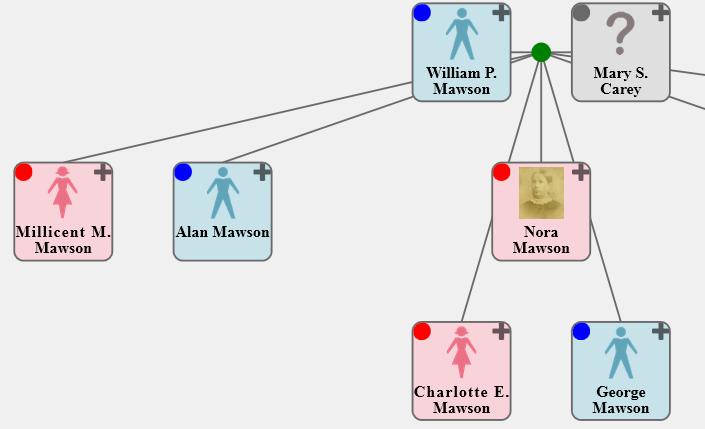
The following image shows a partial tree demonstrating the possibility of bigger buttons (in both default and icon modes) and the use of stock images for person-boxes having no thumbnail image. It also demonstrates the use of opaque person-boxes in conjunction with "fanned" lines.


Applications and Services

One of the main goals of SVG-FTG was to produce interactive trees — not just static images. That means being able to utilise a tree as the user interface (UI) to different applications and services, or in other words to make a tree do things for you. Previous versions already offered some examples in the form of 'Timeline Reports' and pop-up 'Information Panels', but they sometimes required editing of the code.

This is arguably one of the biggest changes to SVG-FTG as those previous applications, and several new ones, have now been packaged up. This means that their definitions and configurations have been placed in a separate registration file, and the end-user just selects the required ones from a simple menu; there is no longer any requirement to see or change code as it's now generated for you, based on your selections.

If you require applications to be configured differently (e.g. change the mouse-click operations, change the button allocations, or even to add new buttons) then it can be done with a small adjunct to the standard registration file; you don't have to edit the distributed standard one.

Additional applications (i.e. in addition to the existing Information Panels and Time Reports) include:

Expand Notes

If you are working in SVG-only mode, or you have lengthy biographical notes, possibly with multiple images, then the existing Information Panels may be insufficient. This application allows them to be displayed in a separate browser tab instead. For instance:

Notes for family of Henry Proctor and Elizabeth Turton


Married 2 Oct 1858 at Nottingham St Nicholas.

Find Persons

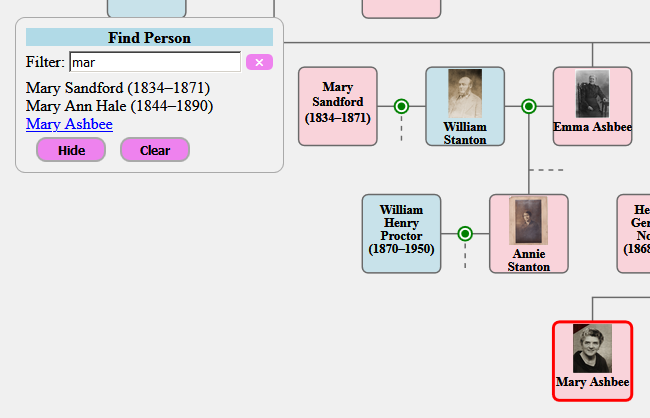
With a large tree, it can be hard to find specific persons. This application provides a floating (i.e. movable) search box that allows you to filter a list of the available person captions until you can see the one(s) that you want. You can then select from the list which will cause them to become highlighted.


As you type a partial caption name into the search box, the list of possibilities is filtered. You can select multiple captions, and the borders of the selected ones are highlighted as shown above. As well as highlighting a relevant person-box, a selection also ensures that it is visible by automatically scrolling the tree as necessary.

The 'Clear' button removes those highlights, and the 'Hide' button collapses the search box until you need it again.

Ancestor Links

This application is similar to the standard RootKey feature provided by SVG-FTG, except that it is dynamic. Clicking on the button (a tree icon by default) for any person will show their maternal and paternal ancestral paths, all the way to the top of your tree. For instance:


Alternatively, performing a shift+click operation on the button will just highlight the relevant person-boxes of the ancestors, as in the Find Persons application, above. An alt+click operation will show both modes together. A control+click operation on the button clears the current highlighting.

The application collaborates with the older RootKey feature to provide a "start-up person" in your tree. Such a person is highlighted and scrolled into view.

Compendia

This application uses pairs of titles and URL data links held in the "program data" tab of persons (and families). Clicking on the button (a document icon by default) will present a list of any such references in a floating dialog, and clicking on any of the entries will show their contents in a new browser tab.

These references may be to articles, blog-posts, documents (e.g. PDF), images, or anything with the URL link.


A shift+click on that button will highlight all persons or families that have at least one data link in common with the clicked one, implying that they share references in the same article or appear in the same image. An alt+click on the button will highlight all persons (and families) having any such references available. A control+click on the button will clear any current highlights on all elements.

Linked Trees

This application allows you to link together separate trees such that clicking on a person-box button will take you to some associated person in a target tree, or present you with a menu if there are several to choose between. The application is general-purpose, but it is also employed by the Tree Viewpoints, described below.

Application Development

The packaging framework for interactive applications and services is open, meaning that it is documented and it can be added to, allowing custom applications to be shared with other users. If you are a developer, or a "power user", then you can write your own applications and register them for selection by end-users using the same mechanism provided for registering and configuring the predefined ones.

There are many new features for helping such development, including several libraries of code for accessing 'navigation data' (data about persons or families, and their relationships), 'notes data' (i.e. biographical notes, images, links), and 'program data' (application-defined data). Services, as distinct from applications, include reusable UI elements, such as a message-box dialog for reporting errors or asking questions, and a menu dialog for making a choice from several alternatives.

Tree Viewpoints

A disadvantage of presenting all your persons and families at the same time is that (a) it rapidly becomes unreadable, (b) the lines become messy because they usually have to cross over each other, and (c) it consumes more memory. Most products avoid these issues by keeping all the persons and families in a database, and only showing you a selected group at once, which inevitably means that you no longer have any control over their layout.

A viewpoint is a view onto a sub-tree of your loaded persons and families. What this means is that although the full tree will still show every person and family that you have defined, a viewpoint can be used to focus on just a few of them. You can have many viewpoints defined, and persons or families may appear in multiple viewpoints if required.

When a viewpoint is loaded into the Tree Designer, things operate virtually the same as when a full tree is loaded, except that there is less clutter and complexity. A typical usage of viewpoints is to break down a large tree by surname or by family groups.

It is very easy to flip between your viewpoints in the Tree Designer, or to find a person among multiple viewpoints. A Viewpoint Manager is provided to help with creating, deleting, and modifying viewpoints, but also to manage the allocation of persons and family groups to at least one viewpoint. A typical goal is to view your final family tree as a set of sub-trees, each in a separate browser page, and all connected by hyperlinks. In order to achieve this, the Viewpoint Manager helps you manage the dividing-up of the full tree, and ensuring that no person has "fallen through the cracks".

When the HTML (or SVG) code is generated for your browser, by the 'View' button, then it utilises the Linked Trees application. This general-purpose application allows users to link their trees according to different person roles, but the viewpoint feature also uses it to link the viewpoints according to persons in common between them.

The following illustration of clicking on a button in a person-box and selecting an option to go to another viewpoint in a second tab is based on a sample distributed with SVG-FTG.


An important feature of the Linked Trees application is that it names the tabs, which allows it to maintain a finite set of them. If a target tree is already loaded then control is transferred there rather than loading it yet again. Having parallel access to these "tabbed trees" is very powerful given that they can each run their own applications.

GEDCOM

Previous versions already allowed the importing of GEDCOM data, but it is now possible to export your current tree in GEDCOM format. It should be noted that the tree definition format, as used by SVG-FTG, and GEDCOM serve quite distinct purposes, and so totally lossless round-trips (e.g. when importing a GEDCOM file and re-exporting it) is not guaranteed.

As well as exporting all the person and family details (including their notes) that you have loaded in SVG-FTG, this operation also saves your place-key mappings, your tree layout (i.e. person-box coordinates), and any local settings on your persons and families. It saves a copy of the remote (URL) version of any image references that employ place-keys (i.e. the mechanism used to access both local and remote resources in parallel). It does not save any details from the 'Program data' tabs or any of your viewpoint definitions.

The existing GEDCOM import has also been enhanced in the area of personal names, particularly where a person has multiple names, or they have been stored in itemised format rather than as a single string. The import operation also acknowledges any adopted or fostered status of children in a family.

Settings

The standard settings form has been split into one for core settings (as used by everyone) and one for advanced settings (as used more by developers or "power users"). The first of these is very similar to the form used in previous versions, except for a few new options and control over any stock images to be displayed in the absence of thumbnail images. The advanced-settings form contains options relevant to the size and position of person-boxes, button configuration, code generation, and nominating a background image.

Media Enhancements

Users may have experienced problems with record terminators when moving files between Microsoft and Apple systems, or even when loading GEDCOM files exported by certain systems. SVG-FTG now endeavours to identify which terminators are being used, and then honour appropriately. This even includes the non-standard CR-CR-LF that often results when a file generated on one system is processed on a different one.

Through a limitation of a code library being used by SVG-FTG, it was not possible to specify PNG images in the Tree Designer, although all image formats are accepted in the output files by the browser. This has now been fixed by adding custom code to specifically support PNG. The change should be seamless so that you can select either PNG, JPG, or the other formats, in the same way.

Sundry

The edit-person form can now capture multiple personal names, as distinct from the long and short person-box captions. This is particularly important if you intend to interface to other systems, such as through GEDCOM export.

The editing of HTML notes for persons or families has been enhanced so that it automatically finds the corresponding start and end tags, and offers forms for editing selected elements. Those forms will preserve any attributes that it does not yet support.

When creating either a person or a family, a default key name is automatically generated. This can, of course, be modified if you don't like it, but it is designed to help make the process quicker.

Previous versions of SVG-FTG offered three sex options: male, female, and unknown/unspecified. This is now supplemented by a further indeterminate/other option.

The 'Find Person' menu option in Tree Designer now scrolls a selected person-box into view if it is not currently visible. It will also find a person across any viewpoints that you may have defined. The option can now be accessed using a Ctrl+F shortcut in addition to the normal menu option.

SVG-FTG relies on a number of external resources for the output HTML/SVG to work, and this includes JavaScript files, CSS files, and icons. Although these were held in a folder on a neocities.org site, all references now use a custom domain in order to obscure and decouple that connection (i.e. https://parallaxviewpoint.com/SVGcode).